Exhibitor & Sponsor Portal

Exhibitor & Sponsor Portal
Section Menu
Section 1 Section 1 homeDeadlines
Accessibility
Car parking
Catering & refreshments
Cloakroom
Event app
Exhibitor & guest tickets
Floor plan
Location & directions
Marketing
Open Banking Expo Awards
Show opening hours
Team contacts
Venue Section 2 Section 2 home
Deadlines
Access on event days
Artwork spec for your stand
AV
Build and breakdown
Additional Electrical & lighting
Furniture
Lead capture
Loading bay
Stand upgrade Section 3 Section 3 home
Deadlines
Access on event days
AV
Build and breakdown
Construction regulations 2015
Electrical & lighting
Furniture
Insurance – Public liability
Lead capture
Loading bay
Stand plan
Stand upgrade Section 4 Section 4 home
Deadlines
Access on event days
Additional lighting and electric
Artwork spec for your stand
Breakdown
Build
Lead capture licences
TV screen presentation Section 5 Section 5 home
Advice for exhibitors
Carpets
Catering
Cleaning
Deliveries
Dilapidation
Emergency procedures
Fire & safety
First aid
Internet connection
Loading bay procedures
Security
Venue rules & regulations
Venue construction design management induction
This Exhibitor & Sponsor Portal provides key information relating to your participation at Open Banking Expo 2026 at the Business Design Centre in London and should answer the many questions you may have.
If you do not have an exhibition standPlease refer only to Section 1. If you have booked a shell scheme exhibition stand
Please refer to Sections 1, 2 and 5. If you have booked space only and you are using a third party contractor to build your stand
Please refer to Sections 1, 3 and 5. If you have booked space only and have opted for one of our turnkey upgrade packages
Please refer to Sections 1, 4 and 5.
If you are not sure what option you have booked, please contact Lillie.cook@openbankingexpo.com.
Section 1
Deadlines
| Action points | Deadline |
|---|---|
| Register your exhibitor and guest tickets | 29 September |
Accessibility
The Business Design Centre is a fully DDA compliant venue.
There are 8 dedicated parking spaces for blue badge holders in the on-site car park with a passenger lift to street level or the BDC forecourt.
All levels of the venue are accessible via passenger lifts, with low-reach buttons, braille, back mirrors and distress alarms. Every staircase in the BDC has handrails. All publicly accessible areas of the venue are well-lit.
For further information please visit https://www.businessdesigncentre.co.uk/visitors/accessibility/ or contact the concierge team on 0207 288 6475.
Car parking
There is a payable car park adjacent to the Centre with approximately 200 spaces. Please note there is a 1.9m height restriction. There are also other car parks within walking distance of the Business Design Centre.
Please use the link https://www.businessdesigncentre.co.uk/visitors/parking/.
Catering & refreshments
As Open Banking Expo has grown from a small conference to a large-scale exhibition, our event model has evolved. We no longer operate under a day delegate package, and therefore catering is not included in partnership packages.
Food and beverages can be purchased onsite from a range of outlets at the BDC and across the Show Floor.
CLoakroom
A cloakroom is available adjacent to the registration area and will be open throughout the event. Items (bags, coats, luggage) are charged at £2.00 per item.
Event app
Make sure you and your colleagues download the Open Banking Expo event app using the email address you are registered with for the event. Click on the relevant app store logo below:


Click on the edit button above your name and job title/company, then, proceed to edit your personal profile.
Please make sure you add a photograph, check your job title is correct, and add a couple of sentences in your biography, as a minimum.
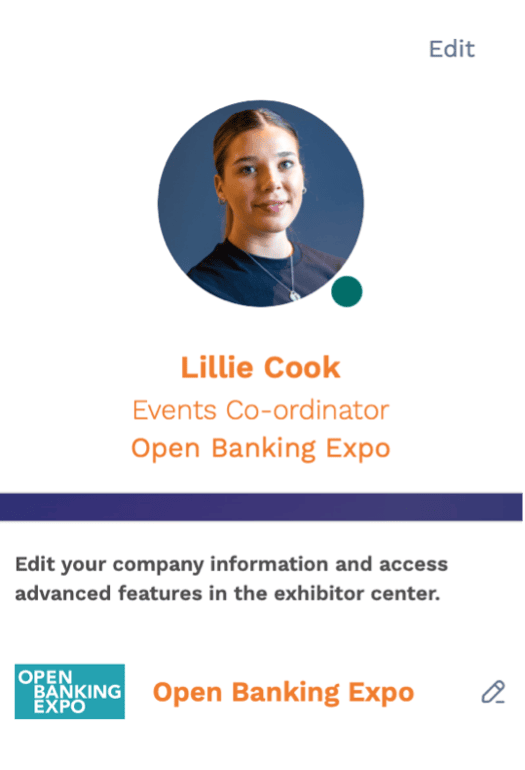
Underneath your profile box will be the name of your company and an edit button (the pencil).
Click the edit button, and this will open a new tab called
‘Exhibitor Centre’. All editing of your booth is done within the ‘Exhibitor Centre’.
Choose the options in the left-hand menu:
- Company profile – here you can set up your virtual booth. You can upload your logo bio and your company details. You can also add a web address, social media links and an advert.
- Your team – we will manually add your team members to your virtual booth as they are registered for the event.
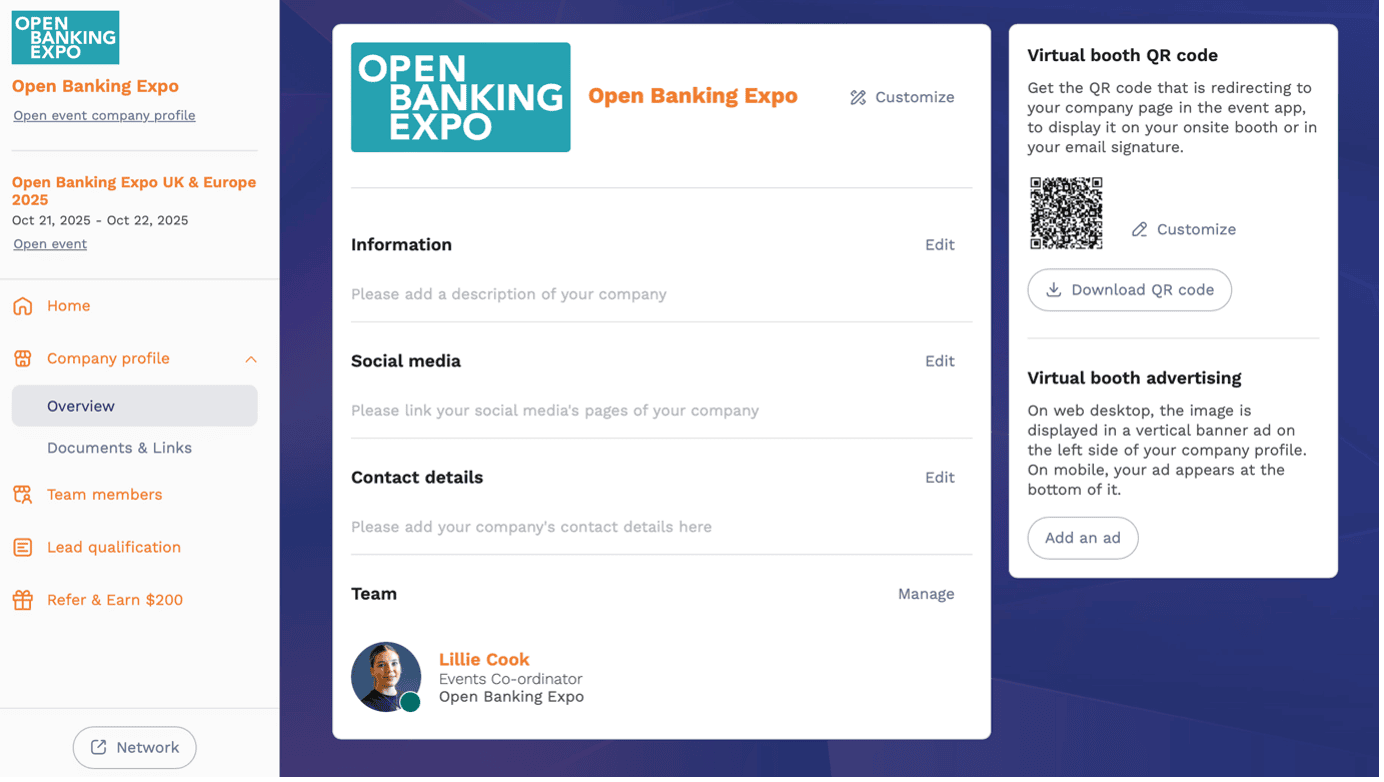
Asset sizes:
(None should be larger than 1MB)
- Header image: 1200x675px (16:9 ratio)
- Logo: 400x200px (2:1 ratio)
- Advert: 1080x1920px (9:16 ratio)
- Background image: 2560x1600px (16:10 ratio)
Navigate to the event home screen, by clicking the ‘HOME’ menu option:
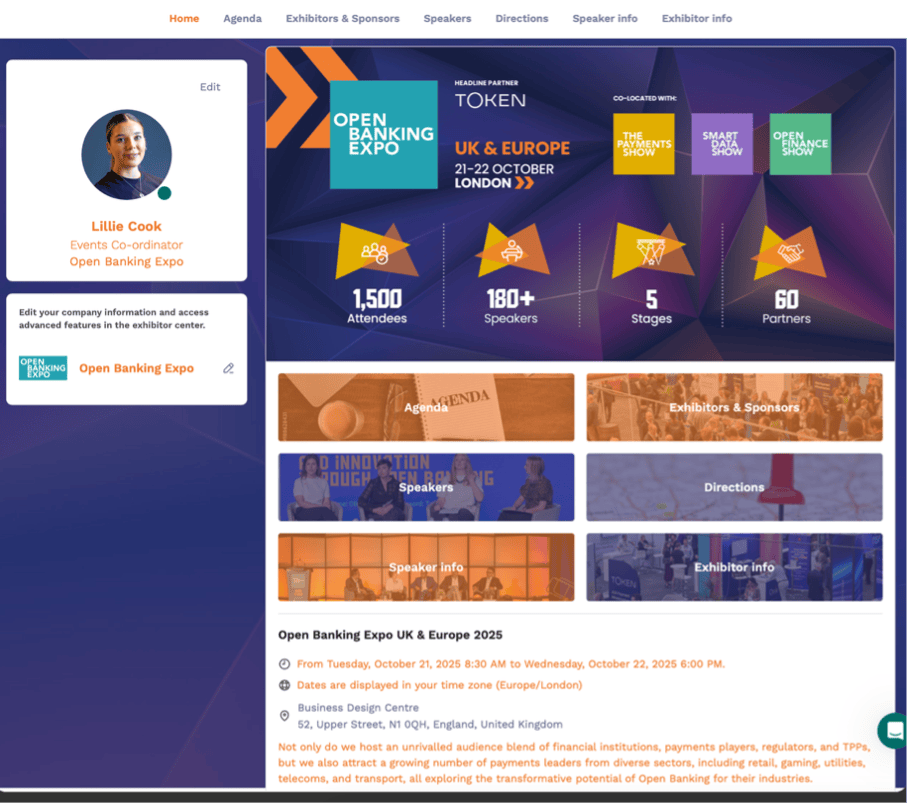
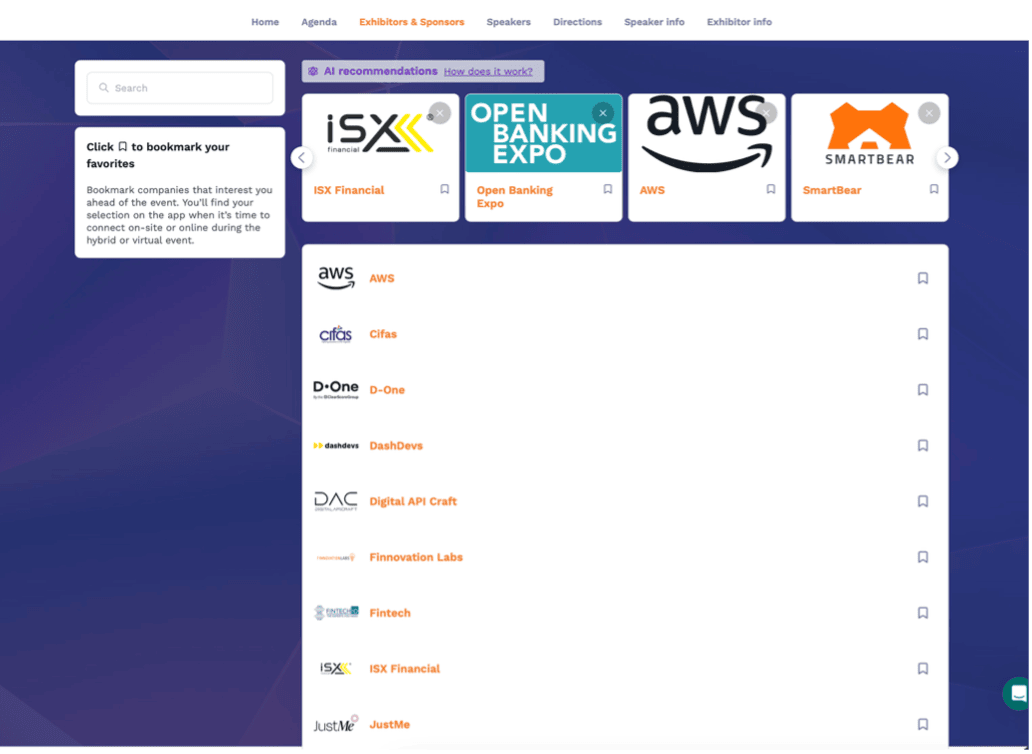
Then click on the Exhibitors & Sponsors button or menu option and it will look like this for you to select your booth from and view it as an attendee.
Exhibitor & guest tickets
Please refer to your partnership agreement to check how many exhibitor and guest tickets you have. Click here to view the packages sheet – at the bottom it states how many are available according to each partnership level.
Complimentary tickets are provided as a benefit of your partnership and are intended for your invited guests. Open Banking Expo reserves the right to review and cancel any complimentary ticket registration at its discretion.
Please register your exhibitor tickets here.
Please register your guest tickets here.
Please ensure you register your exhibitor and guest tickets by 29 September 2026.
Floor plan
Floorplan will be available soon.
Location & directions
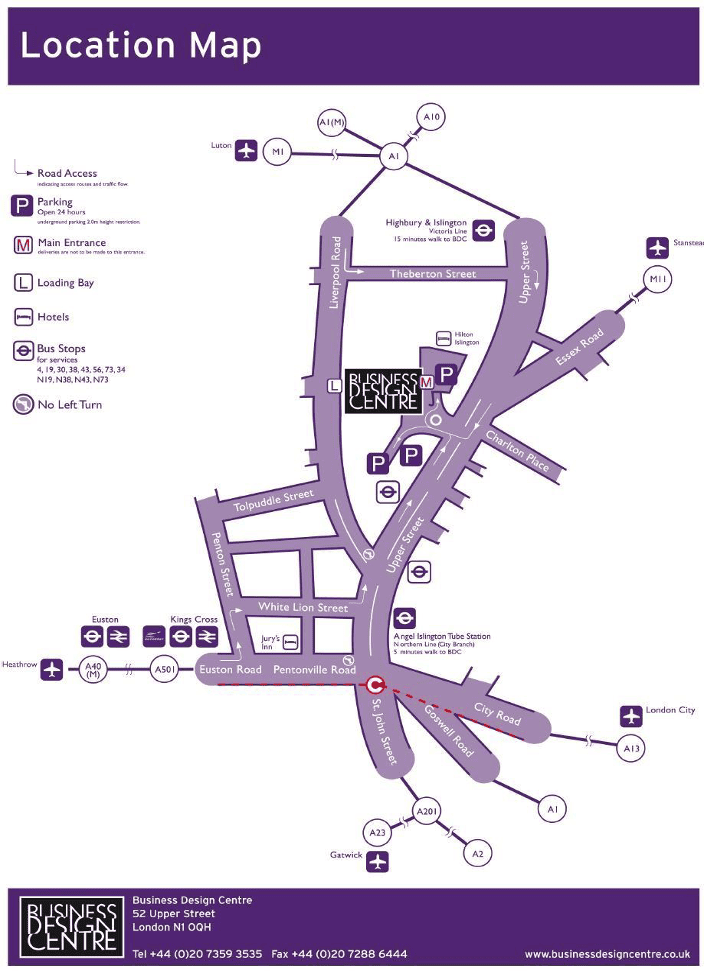
By bus – The following bus routes all stop near to the Business Design Centre on Upper Street: 4, 19, 30, 73, 43, 38, 56, and 341.
By car – Easy access from the City and West End. Upper Street forms part of the A1. (See Car Parking page 10)
By rail – Euston and Kings Cross Stations are a short distance away.
By underground – A regular underground train service (Northern line) runs to and from the Angel Station, which is a two-minute walk from the Centre. Alternatively, Highbury & Islington Station (Victoria Line)/Overground is a fifteen-minute walk from the Centre.
Outside the UK – Getting to the venue from outside the UK is also an easy and stress-free option, with Gatwick and Heathrow and Stansted being our closest London airports. Accessing the Business Design Centre from the airport can be done through the express train service from Gatwick, Heathrow and Stansted that run regularly throughout the day into Central London.
Please follow this link for the Islington local area map and further instructions on how to get to the Business Design Centre.
Marketing
Maximise your visibility in the run-up to Open Banking Expo UK & Europe with our free promotional tools. From partner banners and bespoke creatives to ready-made email templates and social media tips, we’ve made it easy to showcase your involvement and spread the word across your networks.
Partner bannersDownload the relevant partner banner to share on your social channels. Simply choose your banner from the dropdown and post away.
[fl_builder_insert_layout id=46370]
Email signatures & templatesPromote your participation every day by adding branded assets to your email signature, website, newsletters, and more. Need something specific? We’ll happily design the assets for you and send them over, ready to use.
Custom bannersNeed something specific? We can create tailored banners in any size for any platform – perfect for your signature, website, or marketing campaigns. Just send us the dimensions or platform details, and we’ll do the rest.
Email templatesWant to tell your audience you’ll be at Open Banking Expo? We’ve got a ready-to-use email template with all the key event info and your involvement front and centre. Drop it into your comms, send, and you’re done.
📧 To request a bespoke banner or the email template, contact lillie.cook@openbankingexpo.com.
PR – spread your newsGot a product launch, new service, or exciting innovation to showcase? Let us know so we can help you amplify it. Add Ellie Duncan to your press distribution list: Ellie.duncan@openbankingexpo.com.
Social mediaTap into our growing community by:
- Following us on LinkedIn and subscribing to our LinkedIn newsletter
- Using our hashtags: #obexpo #openbanking #openfinance #smartdata #A2Apayments #fintech #payments
✅ Post your partner banner with your stand number
✅ Tag us in your posts so we can share them
✅ Use these hashtags: #obexpo #openbanking #openfinance #smartdata #A2Apayments #fintech #payments Social post starter kit – copy, paste, edit, post!
📢 We’re exhibiting at Open Banking Expo UK & Europe on 13-14 October at the Business Design Centre, London! Come and meet us at Stand [XX] to discover [product/service/solution]. Save 20% on tickets by quoting PARTNER20.
📅 Save the date – join 1,500+ industry leaders to shape the future of Open Banking, Open Finance, and Smart Data.
👉 Register here: https://dev-obe.pagehubdesign.co.uk/uk/register/
#obexpo #openbanking #openfinance #smartdata #A2Apayments #fintech #payments
On-siteBefore and during the event, keep the momentum going and maximise your marketing impact:
- Announcements– Let us know about any networking sessions, press events, or activities on your stand so we can share them in live announcements on the show floor and via our event app notifications.
- Social– Post regularly before, during, and after the event. Follow and use the event hashtags to join the conversation and boost your visibility.
- Offers & competitions– Running a giveaway or special offer? Tell us so we can help promote it through our social channels and the event app to drive more delegate engagement.
Open Banking Expo Awards
The Open Banking Expo Awards take place on Tuesday 13 October. Unless otherwise stated, tickets are not included in your partnership package for the Awards.
Show opening hours
Tuesday 13 October: 08:30 – 17:00Wednesday 14 October: 09:00 – 17:30
Times subject to change dependent on agenda confirmation
Team contacts
Commercial:
Adam CoxTel: +44(0)7825 295222
Email: adam.cox@openbankingexpo.com Ross Green
Tel: +44 (0)7742 809001
Email: ross.green@openbankingexpo.com
Operations:
Kelly StanleyTel: +44 (0)7970 641599
Email: kelly.stanley@openbankingexpo.com Lillie Cook
Tel: +44 (0)7548 831519
Email: lillie.cook@openbankingexpo.com
Marketing:
Kelly ShaveEmail: kelly.shave@openbankingexpo.com Kelly Stanley
Tel: +44 (0)7970 641599
Email: kelly.stanley@openbankingexpo.com
Speaker liaison:
Lillie CookTel: +44 (0)7548 831519
Email: lillie.cook@openbankingexpo.com
Content:
Adam CoxTel: +44(0)7825 295222
Email: adam.cox@openbankingexpo.com Ellie Duncan
Email: ellie.duncan@openbankingexpo.com
Venue
Business Design Centre52 Upper Street
London
N10 QH
Front Desk Concierge: +44 (0) 207 359 3535
Section 2 – SHELL SCHEME STANDS
Shell scheme stands include one 13amp socket (a double socket), two spotlights and a name board. It also includes two passes per 6sqm.
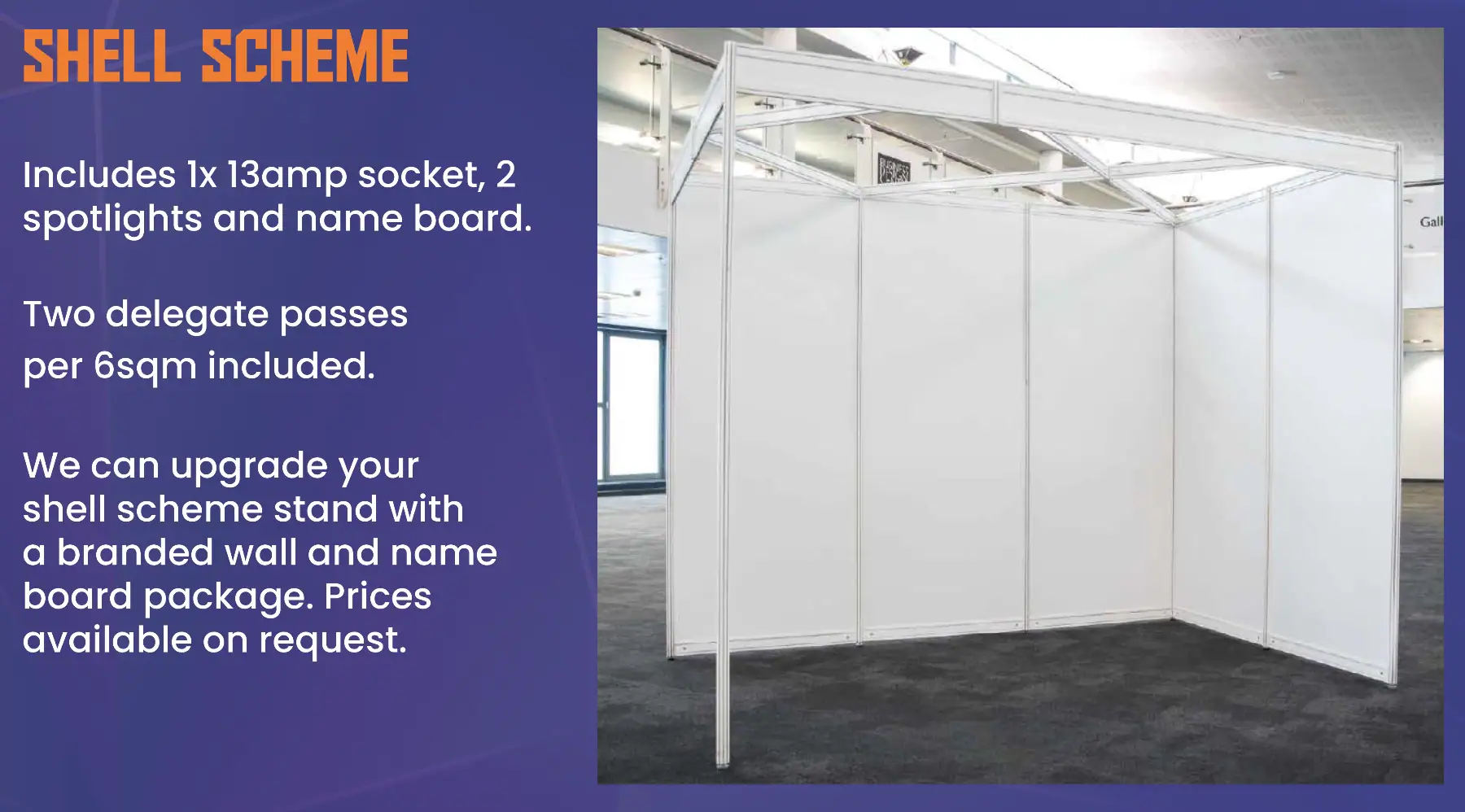
Visit the Stand Upgrade menu option for more information.
Deadlines
| Forms/action points | Deadline | How |
|---|---|---|
| Artwork for shell scheme graphics upgrade (if you have upgraded) | 26 September | Email to Lillie.Cook@openbankingexpo.com |
| Furniture | 29 September | Exhibition Order Form – Open Banking Expo |
| Additional lighting & electrics For orders after this date, a 20% late surcharge for exhibitors will be applied by BDC. |
28 September | bdceventportal.bdc.london/exhibitor/OpenBankingExpo26 |
| Order wired internet connection if needed For orders after this date, a 20% late surcharge for exhibitors will be applied by BDC. |
28 September | bdceventportal.bdc.london/exhibitor/OpenBankingExpo26 |
| AV | 15 October | http://bit.ly/OpenBankingAV |
| Deliveries to arrive at venue (for leaflets, giveaways, etc) | 12 October from 0800 | Use correct address (see section below) |
Access on event days
Exhibitors will have access to the exhibition hall from 08:00 on Tuesday 13 and Wednesday 14.
Artwork spec for your stand
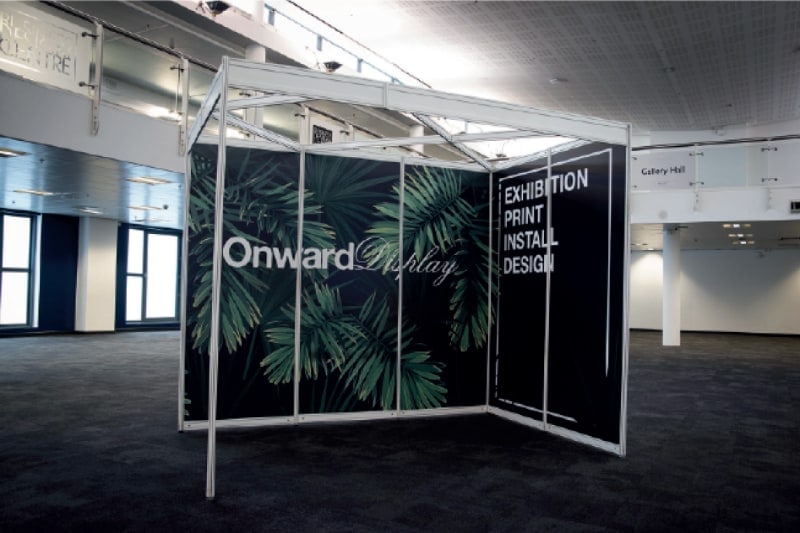
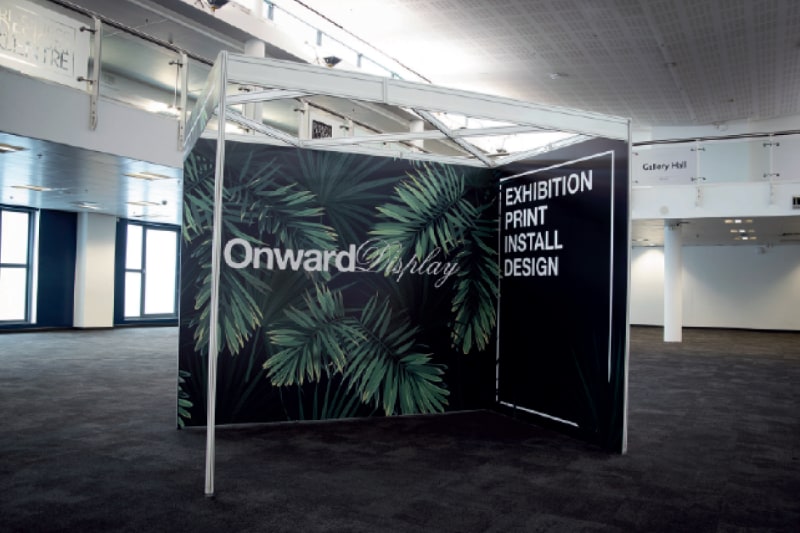
If you have upgraded to the seamless graphics package for your shell scheme stand, please download the relevant template and artwork specification guidelines and supply your completed artwork to Lillie.Cook@openbankingexpo.com by 26 September.
3m x 2m Stand LEFT – stand numbers: G7, G5, G13, G15
3m x 2m Stand RIGHT – stand numbers: G6, G8, G14, G16
If you are unsure which shell stand you have, please contact Lillie.
AV
First Sight Media have been appointed as the AV supplier for Open Banking Expo 2025. Please see their order form here. Deadline is Wednesday 15 October.
Build and breakdown
Build is on Monday 12 October and all stands must be complete by 17:00. Your shell scheme stand will be ready to decorate from 15:00.
Any waste that cannot be placed into a refuse sack must be removed from the hall. Any packaging/crates etc., that must be removed by the organisers will incur a surcharge, which will be passed onto each exhibitor. Please ensure all staff setting up your stand are given this information.
Children under 16 are not permitted in the hall during build-up or breakdown for health and safety reasons.
Breakdown will commence on Wednesday 14 October from 18:00. Please do not start before this time.
All stands must be cleared by 22:00, when the loading bay closes. We will dismantle your shell scheme stand for you, but you must box up any of your materials by 22:00 and make arrangements for their collection either from the loading bay before 22:00 or they can be stored for collection on 15 October.
Please print the build-up and breakdown pass and display in your vehicle for build-up and breakdown.
Electrical & lighting
Your shell scheme stand includes 1x 13amp socket (a double socket), 2 spotlights and name board.
If you wish to order any additional electrical and lighting, please follow the instructions below to order electrics and lighting for your stand.
- Go to bdceventportal.bdc.london/exhibitor/OpenBankingExpo26
- For first time users select register. (Existing users can login and add new shows to their account)
- Once registered you will receive a confirmation email that users will have to click the link to activate their account.
For any queries regarding the online ordering system please contact harrietth@bdc.london.
For orders after 28 September, a 20% late surcharge for exhibitors will be applied by BDC.
Furniture
Yahire have been appointed as the furniture supplier for Open Banking Expo 2025. Please see their brochure and order form here or contact Yahire directly at nathan@yahire.com or info@yahire.com. Deadline is Tuesday 29 September.
If you have opted to upgrade your shell scheme stand to the seamless graphics package, you have a lockable cupboard, x1 high table and x2 stools included.
Lead capture
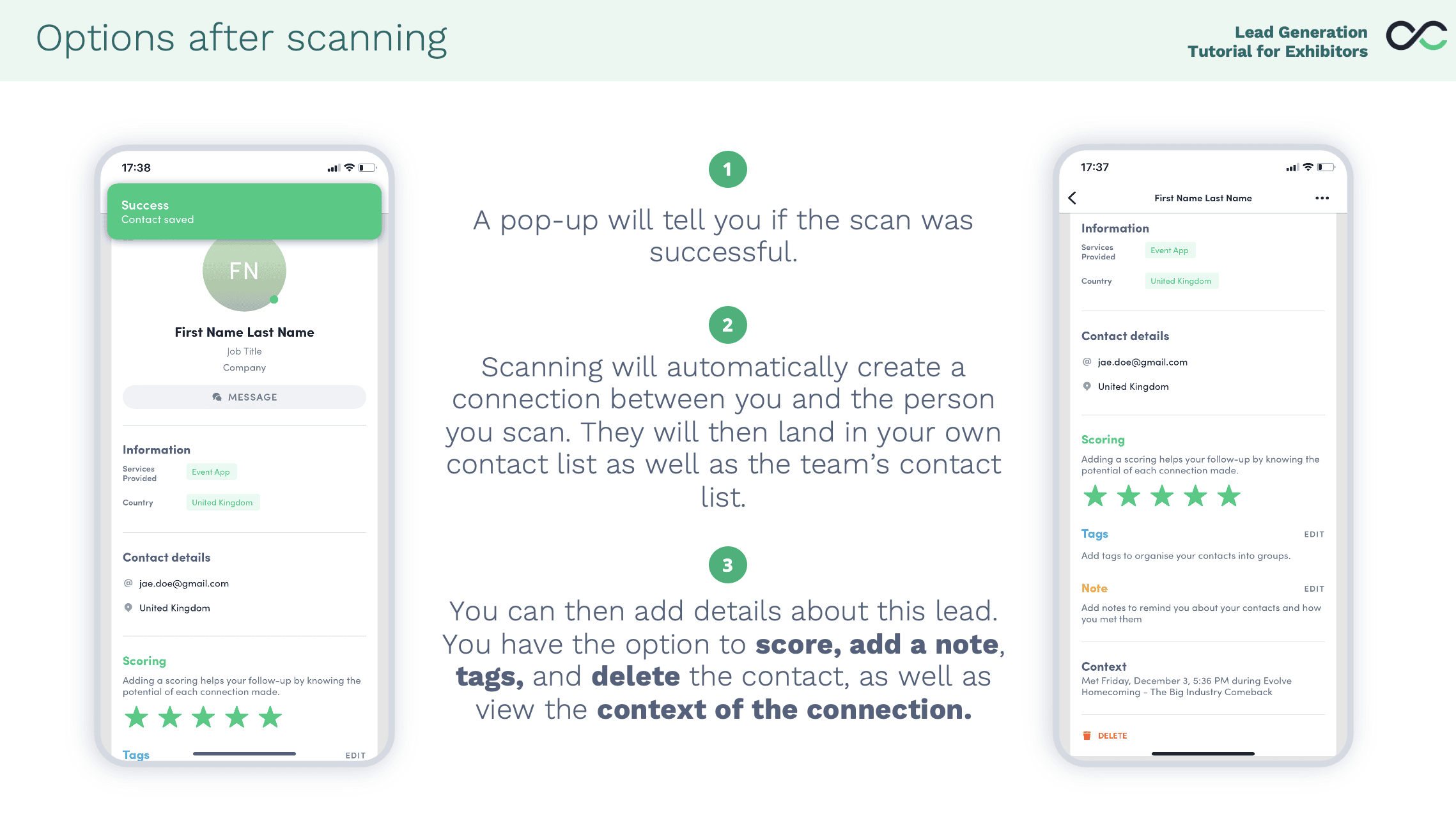
Even if you do not have an exhibition stand onsite, you have the opportunity for a virtual booth in the event app, which means that all your staff attending the event can capture leads. It is super simple! To scan a lead:
- Open the event app, sign in using the email address you are registered for the show with
- Tap on the camera icon at the bottom of the page. This opens the event app camera.
- Scan the attendee badge
- You will get a ‘success message’ (see below)
All your team contacts will be added into your exhibitor centre, from which you can export your leads after the show.
NB – It is important that all your staff are added to your virtual booth to export their leads. We will do our best to add anyone missing from your organisation to your virtual stand, but you can do it yourself in the exhibitor centre.
Loading bay
Please note the loading bay opens at 08:00 and closes at 22:00.
There can be no early or late arrangements due to council restrictions. Please ensure your couriers are given this information.
stand upgrade
You can upgrade your stand space with one of our sustainable packages, which include graphics and furniture. View the Open Banking Expo shop here to explore your upgrade options, and contact Lillie.Cook@openbankingexpo.com if you have any questions.
Section 3 – SPACE ONLY STANDS
If you have a space-only stand, please share this partner portal with your stand builders. Open Banking Expo requires you to provide a stand plan two months before the show to ensure there are no issues with neighbouring stands or show features.
Space-only stands are exactly that: space, power, lighting, furniture, hard-wired Wi-Fi, catering, and lead capture are not included. You can order these services through this section of the portal.
Space-only stands are not suitable for pull-up banners or pop-up displays. If you plan to use these, please contact Lillie.cook@openbankingexpo.com so we can move you to a more suitable position. Alternatively, we offer sustainable turnkey upgrade packages for all stand sizes, which may be of interest. Please contact Lillie for more information.
Deadlines
| Forms/action points | Deadline | How |
|---|---|---|
| Complete stand plan form | 21 August | Space only stand form |
| Furniture | 29 September | Exhibition Order Form – Open Banking Expo |
| Health & safety declaration & risk assessment | 28 September | bdceventportal.bdc.london/exhibitor/OpenBankingExpo26 |
| Lighting & electrics For orders after this date, a 20% late surcharge for exhibitors will be applied by BDC. |
28 September | bdceventportal.bdc.london/exhibitor/OpenBankingExpo26 |
| Order wired internet connection if needed For orders after this date, a 20% late surcharge for exhibitors will be applied by BDC. |
28 September | bdceventportal.bdc.london/exhibitor/OpenBankingExpo26 |
| AV | 15 October | http://bit.ly/OpenBankingAV |
| Deliveries to arrive at venue (for leaflets, giveaways, etc) | 12 October from 0800 | Use correct address (see section below) |
Access on event days
Exhibitors will have access to the exhibition hall from 08:00. Any final dressing of stands MUST be completed by 08.30.
AV
First Sight Media have been appointed as the AV supplier for Open Banking Expo 2026. Please see their order form here. Deadline is Wednesday 15 October.
Build and breakdown
Build is on Monday 12 October and all stands must be complete by 17:00. Access to the building is from 09:00.
Any waste that cannot be placed into a refuse sack must be removed from the hall. Any packaging/crates etc., that must be removed by the organisers will incur a surcharge, which will be passed onto each exhibitor. Please ensure all stand contractors are given this information.
It is a requirement of the Business Design Centre that all exhibitors and contractors adhere to the following regulations regarding access to and from the loading bay and Liverpool Road.
For Liverpool Road use postcode N1 0RJ. This is for vehicular access to the loading bay only, pedestrian access is not permitted. Once unloaded we would ask you to please remove your vehicle immediately to allow access for others.
Children under 16 are not allowed in the hall at any time during build-up or breakdown for health & safety reasons.
Breakdown will commence on Wednesday 14 October from 18:00. Please do not start before this time. All stands must be cleared on Wednesday night by 22:00.
The loading bay closes at 22:00 sharp. There can be no extensions to this time.
Please print the build-up and breakdown pass and display in your vehicle for build-up and breakdown.
Construction (design & management) regulations 2015
In order to access the Business Design Centre during either build or breakdown, all members of your team and your contractors must have read the Business Design Centre CDM Venue Induction Pack. This includes staff delivering or removing your exhibits, MD’s, CEO’s, temporary staff etc – everyone who requires access into the Centre. This pack is provided along with the Exhibitor Manual.
It is your responsibility to ensure each employee has read the induction pack. Please tick the box using the Health & Safety Declaration Form to confirm you will supply this to all of your team.
Under the new HSE CDM regulations, the exhibitor and the stand contractor are fully responsible for health & safety on their stand. If there is an incident and the person injured has not read the induction sheets you could be liable for prosecution under criminal law.
Electrical & lighting
Please follow the instructions below to order electrics and lighting for your stand.
- Go to bdceventportal.bdc.london/exhibitor/OpenBankingExpo26
- For first time users select register. (Existing users can login and add new shows to their account)
- Once registered you will receive a confirmation email that users will have to click the link to activate their account.
For any queries regarding the online ordering system please contact harrietth@bdc.london.
For orders after 28 September, a 20% late surcharge for exhibitors will be applied by BDC.
Furniture
Yahire have been appointed as the furniture supplier for Open Banking Expo 2025. Please see their brochure and order form here or contact Yahire directly at nathan@yahire.com or info@yahire.com. Deadline is Monday 29 September.
Insurance – Public liability
It is a contractual requirement for you to have public liability cover for your attendance at the event for a minimum of £2million.
Lead Capture
Even if you do not have an exhibition stand onsite, you have the opportunity for a virtual booth in the event app, which means that all your staff attending the event can capture leads. It is super simple! To scan a lead:
- Open the event app, sign in using the email address you are registered for the show with
- Tap on the camera icon at the bottom of the page. This opens the event app camera.
- Scan the attendee badge
- You will get a ‘success message’ (see below)
All your team contacts will be added into your exhibitor centre, from which you can export your leads after the show.
NB – It is important that all your staff are added to your virtual booth to export their leads. We will do our best to add anyone missing from your organisation to your virtual stand, but you can do it yourself in the exhibitor centre.
Loading bay
Please note the loading bay opens at 08:00 and closes at 22:00.
There can be no early or late arrangements due to council restrictions. Please ensure your stand contractors are given this information.
Stand plan
All space only exhibitors must submit their stand plans for approval by Open Banking Expo. Your stand plan should include:
- A scaled drawing or visual showing dimensions, open sides, and any rigging or raised platforms
- A Risk Assessment and Method Statement (RAMS)
- A copy of your Public Liability Insurance (minimum £5 million cover)
Please complete this form.
Submission deadline: Thursday, 21 August 2025
Your stand plan must be approved before you can access the Business Design Centre ordering portal for electrics, furniture, or other services.
stand upgrade
You can upgrade your stand space with one of our sustainable packages, which include graphics and furniture. View the Open Banking Expo shop here to explore your upgrade options, and contact Lillie.Cook@openbankingexpo.com if you have any questions.
Section 4 – Gold, Platinum, Graphene Turnkey Upgrades, Innovation Zone or Barclays Zone Stand
If you have upgraded to a Gold, Platinum, Graphene turnkey package, or you have an Innovation Zone or Barclays Zone stand, you will have one spare power socket. If you wish to order any further power, you can do so in this section. Lead capture is also included; the number of devices can be found in this section and vary by stand size.
Deadlines
| Forms/action points | Deadline | How |
|---|---|---|
| Supply your stand artwork | 12 September | obexpo@whitespacexpo.com |
| Additional lighting and electric For orders after this date, a 20% late surcharge for exhibitors will be applied by BDC. |
28 September | bdceventportal.bdc.london/exhibitor/OpenBankingExpo26 |
| Order wired internet connection if needed For orders after this date, a 20% late surcharge for exhibitors will be applied by BDC. |
28 September | bdceventportal.bdc.london/exhibitor/OpenBankingExpo26 |
| Supply your screen presentation | 9 October | Email to Lillie.Cook@openbankingexpo.com |
| Deliveries to arrive at venue (for leaflets, giveaways, etc) | 12 October from 0800 |
Access on event days
Exhibitors will have access to the exhibition hall from 08:00 on Tuesday 13 and Wednesday 14.
Additional lighting and electric
Electric will be provided to power your TV monitor and stand lighting, and you will have one spare socket. However if you require additional power, please follow the instructions below to order:
- Go to bdceventportal.bdc.london/exhibitor/OpenBankingExpo26
- For first time users select register. (Existing users can login and add new shows to their account)
- Once registered you will receive a confirmation email that users will have to click the link to activate their account.
For any queries regarding the online ordering system please contact harrietth@bdc.london
For orders after 28 September a 20% late surcharge for exhibitors will be applied by BDC.
Artwork spec for your stand
Please download the relevant template and artwork specification guidelines for your stand and supply your completed artwork to obexpo@whitespacexpo.com by 12 September.
If you have a 3×2 gold stand, there are right-hand stands and left-hand stands. Here is a guide to which artwork spec from the files that you need, and you can check the floor plan if you are in doubt what stand number you have.
3m x 2m Gold Stand LEFT – stand numbers: G2, G3, G10, G11, G18, G19, G22, G23
3m x 2m Gold Stand RIGHT – stand numbers: G1, G4, G9, G12, G17, G20, G21, G24
If you are unsure which type of stand you have, please contact Lillie. Or check out the floor plan.
Breakdown
Breakdown will commence on Wednesday 13 October from 18:00. Please do not start before this time.
All stands must be cleared by 22:00, when the loading bay closes. We will dismantle your stand for you, but you must box up any of your materials by 22:00 and make arrangements for their collection either from the loading bay before 22:00 or they can be stored for collection on 15 October.
Please print the build-up and breakdown pass and display in your vehicle for build-up and breakdown.
Build
Your stand will be complete by 16:00 on 20 October. You may arrive from this time to check the graphics or presentation on your monitor or drop off any materials that you plan to display / giveaway.
Lead capture licences
Even if you do not have an exhibition stand onsite, you have the opportunity for a virtual booth in the event app, which means that all your staff attending the event can capture leads. It is super simple! To scan a lead:
- Open the event app, sign in using the email address you are registered for the show with
- Tap on the camera icon at the bottom of the page. This opens the event app camera.
- Scan the attendee badge
- You will get a ‘success message’ (see below)
All your team contacts will be added into your exhibitor centre, from which you can export your leads after the show.
NB – It is important that all your staff are added to your virtual booth to export their leads. We will do our best to add anyone missing from your organisation to your virtual stand, but you can do it yourself in the exhibitor centre.
TV screen presentation
A TV screen is included in your upgrade package, and you will need to send your presentation display to Lillie.Cook@openbankingexpo.com by close of play 6 October in order for them to set it up during Build.
It will then be waiting for you to check on your arrival. You can do this on Build Day – 12 October – from 16:00 onwards. Or you can wait until the morning the show opens. We will contact you during build day if there are any issues setting it up, so please ensure we have your phone number.
Here is a handy AV guide to read here. It includes everything you need to know on how to connect a laptop or USB, and what file types will work. Please ensure you presentation is on loop and you save them as an MP4.
Section 5 – Exhibitor Info
Advice for exhibitors
The Health & Safety at Work Act (HASWA); the Management of Health & Safety at Work Regulations and the Construction, Design & Management Regulations (2015) require that OBExpo takes all reasonable steps to ensure the health, safety and welfare of its employees, exhibitors, contractors and visitors at its events.
Current legislation applies throughout the build-up, open and breakdown periods of the event, as does the eGuide (Guidance for Working at UK Exhibition Venues) which can be viewed at www.aev.org.uk/resources/e-guide.
As Event Organisers it is our policy to manage OBExpo in accordance with the aforementioned regulations as far as is reasonably practicable and this section has been produced to provide exhibitors with clear, simple suggestions for understanding and complying with health & safety procedures at the Event.
It is a contractual (and legal) requirement of the Exhibition each Exhibitor undertakes their own Risk Assessment for their activities on site. ALL Exhibitors MUST complete the HEALTH & SAFETY DECLARATION and RISK ASSESSMENT by 27 September.
Carpets
There are dark grey carpet tiles throughout the venue. These tiles cannot be lifted by exhibitors.
Catering
Under the terms of the tenancy of the Business Design Centre, The Good Eating Company are the venue’s nominated caterer and have sole rights on the provision of food and drink in the building. We ask you do not bring your own food or drink and thank you in advance.
Cleaning
The Business Design Centre contractors will be responsible for the cleaning of the stands and gangways. Please leave all rubbish in the gangways to be cleared away after the event closes. Please note, anything left in the gangways will be considered as litter and disposed of accordingly.
Deliveries
Please ensure all deliveries are labelled with your stand name and number and a contact number. Deliveries should not be delivered to the venue before Build-up commences on Monday 12 October. Items attempted to be delivered before this date will be turned away by the venue.
Your name & stand numberOpen Banking Expo
Business Design Centre
52 Upper Street
Islington
London
N10 QH
Dilapidation
Please remember, you the exhibitor remain responsible for making good any damage caused to the fabric of the building by you, your contractors or your agents.
Please note no materials may be fixed in any way directly to the building walls.
Emergency procedures
Exhibitors are reminded they must comply with the stringent regulations governing materials used on site during an exhibition. Exhibitors must ensure all exhibits are within their stand boundaries and they do not block aisles, fire exits or fire equipment.
If you discover a fire or someone reports a fire to you immediately raise the alarm. This may be done in several ways:
- Pick up any internal phone and dial 6666. This will connect you with reception. Tell the duty operative where the fire is, your location and your telephone extension.
- Operate the nearest fire alarm call point by breaking the glass. If you do this (and it is safe to do so) please stay near the fire point to direct the attending security officer to the fire or dial 6666 and inform the duty operative of the site of fire.
If it is decided to evacuate the building, you will hear the fire alarm bells and tannoy messages informing you to leave the building. Please leave by the nearest fire exit or as instructed by members of the security staff. Please familiarise yourself with the nearest fire exits to your conference room or exhibition stand.
Do not stay in the building once you have been instructed to leave. Do not stay to collect handbags, valuables etc.
Fire assembly points are as follows:
- Front of the building: either the lower forecourt or round the side of the building by the tanning shop
- Rear of the building: pavement area outside the old royal free hospital in Liverpool Road
Do not do anything to endanger your life. Restrict your actions to trying to prevent the fire spreading by closing doors/windows etc & raising the alarm. Try to help by preventing people from going near the fire until help arrives.
Please try to stay calm and encourage others to do the same.
Fire & safety
Any goods attached to a stand will constitute part of that stand and will be subject to the following regulations:
- Exhibitors must understand fire and emergency procedures.
- Artificial plants and flowers must not be used. Silk flowers fireproofed to BS 476 – part 7 are acceptable.
- The gangways are the minimum permissible by law. Under no circumstances may exhibits be allowed to encroach into the gangways. Exhibits must be kept on the stand at all times.
- Excess stock/literature/packaging must not be stored on, around or behind the stands.
- All timber under 1″ thick must be impregnated to class 1 standard. Treated boards will have BS 476 – Part 7 – Class 1 marked on them. Plastics must conform to BS 476 – Part 7 – Class 1. Perspex may not be used.
- Fabrics used must be flame proofed or bought treated in accordance with BS 5438/BS 5852.
- Interior fabrics within stands must be fixed taut and/or in tight pleats (not draped) to a solid backing and secured 3″ above floor level and not touching light fixings.
First aid
First aid facilities will be available during the exhibition at all times. The First Aid room is located on the Gallery Level – opposite the Gallery Hall registration desk. In the case of emergency, contact the medical staff or a member of security on 0207 288 6666.
Internet connection
We are pleased to be able to provide all stands with access to a secure internet connection during the event via the venue’s WIFI. This will give you access to an Open Zone facility which provides up to 0.5mb Wireless Internet Access.
If you have a particular requirement for a specifically wired connection, please order it on the BDC exhibitor portal by 28 September: bdceventportal.bdc.london/exhibitor/OpenBankingExpo26. For orders after this date, a 20% late surcharge for exhibitors will be applied by BDC.
Loading bay procedures
Due to Health & Safety regulations any person entering the venue loading bay must now wear a high visibility vest or jacket and suitable footwear – this will apply to all exhibitors, contractors and delivery persons.
Entry to the loading bay will not be permitted unless a high visibility vest and appropriate closed toe footwear is worn. This will be strictly enforced.
Security
The Business Design Centre will be patrolled by security guards 24 hours a day. Whilst every reasonable precaution will be taken to ensure the safety and security of stands, the organisers cannot accept responsibility for any loss or damage, which may occur. Please do not leave valuable equipment on your stand whilst unattended.
Venue rules & regulations
Please click here to view the official BDC venue rules & regulations document.
Venue construction design management induction
Please click here to view the official BDC construction design management induction document.